How to Remove a Password from a PDF
Short answer
To remove a password from a PDF you're authorized to change, open it, enter the password, and save an unprotected copy. In Adobe Acrobat, use Protect a PDF, then Set security properties, and choose No Security. For free, print the opened PDF to a new PDF in your browser, or use Preview on a Mac. You need to know the password first.
Open Merge PDFKey takeaways
- You generally need to know the password. Acrobat itself offers no recovery option.
- PDFs have two kinds of password: one to open the file and one to restrict editing or printing.
- Saving a copy through a print dialog or Mac Preview is a free way to remove a known password.
- Only remove protection from files you own or are authorized to change.
Before you start: which password does your PDF have?
PDFs use two different kinds of password, and the one you've got decides what you can do. Knowing which applies saves a lot of confusion.
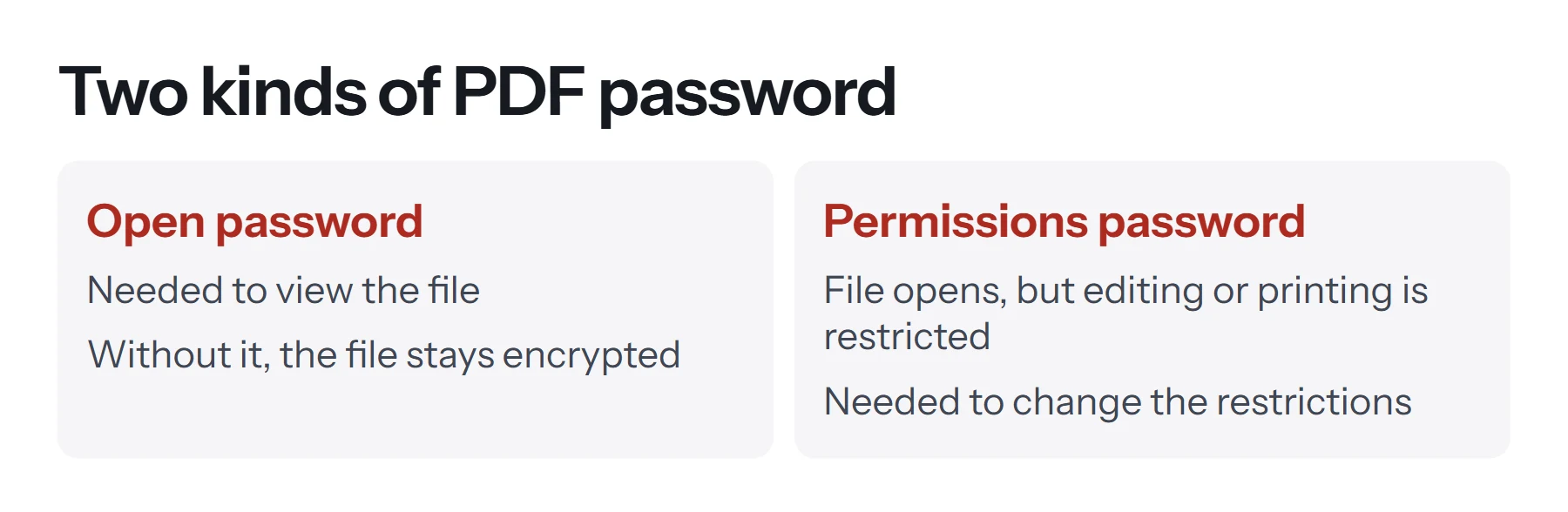
An open password, also called a document open password, must be entered before you can view the file at all. Without it, the contents are encrypted and unreadable.
A permissions password, also called an owner password, lets anyone open the file but restricts what they can do with it, such as printing, copying text or making changes. You'd see this if a PDF opens normally but the print or copy options are greyed out.
This guide covers removing protection from PDFs you own or are authorized to change, such as your own bank statement or a document your employer gave you. We don't cover getting past protection on documents you don't have rights to.
How to remove a password from a PDF in Adobe Acrobat
Acrobat's method is the most direct, and it keeps everything in the file, including links, forms and bookmarks. You need the paid version.
- Open the PDF and enter the password.
- Open the security settings. Go to All tools, then Protect a PDF, and choose Set security properties.
- Remove the protection. On the Security tab, set the security method to No Security.
- Confirm the password. Enter the permissions password if Acrobat asks for it.
- Save the file. Your new copy opens without a password.
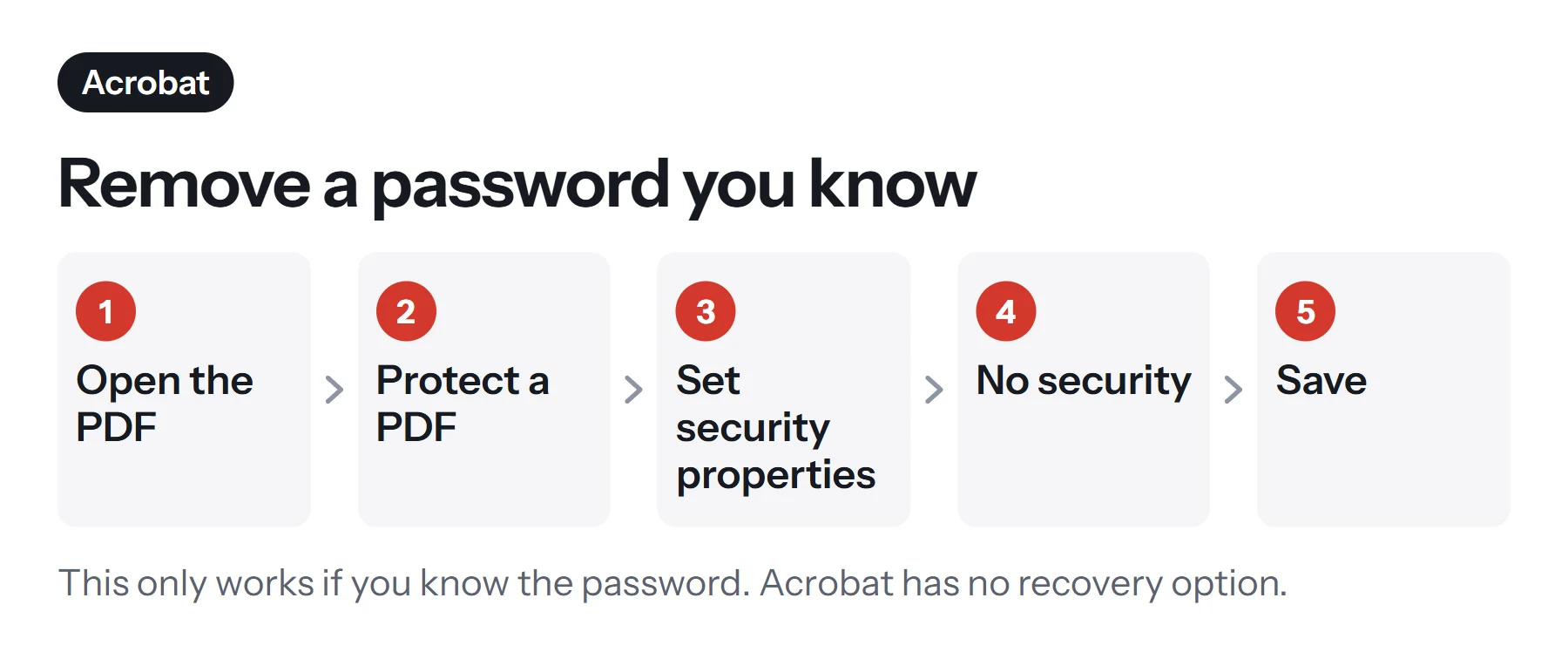
Adobe is clear that you can only remove a password if you know the current one, and that Acrobat has no password recovery option.
How to remove a password from a PDF for free
If you know the password but don't have Acrobat, you can make a new, unprotected copy using tools that are already on your computer.
In Chrome, Edge or another browser
- Open the PDF in your browser. Drag the file into a browser window and enter the password.
- Open the print dialog. Press Ctrl+P on Windows or Cmd+P on a Mac.
- Choose Save as PDF as the destination.
- Click Save. The new file has no password.
If the print option is greyed out, the PDF has a permissions restriction that blocks printing. In that case, you'd need the permissions password or an unrestricted copy from the owner.
In Preview on a Mac
- Open the PDF in Preview and enter the password.
- Choose File, then Export as PDF, or use File, Print, and Save as PDF.
- Save it under a new name. Check that the encryption or permissions options are off when exporting.
On Windows, with any PDF reader
- Open the PDF in your reader and enter the password.
- Press Ctrl+P and choose Microsoft Print to PDF as the printer.
- Click Print, and choose a name and location.
What do you lose when you print to a new PDF?
Printing a PDF to a new PDF is free and easy, but it's not the same as removing the password from the original. You're making a copy of how the pages look.
| Item | Acrobat, No Security | Print to new PDF |
|---|---|---|
| Page appearance | Kept | Kept, with possible slight scaling |
| Selectable text | Kept | Usually kept |
| Links | Kept | Often lost |
| Bookmarks | Kept | Lost |
| Fillable form fields | Kept | Usually flattened into the page |
| Digital signatures | May become invalid | Lost |
| File size | About the same | May change |
So for a statement or a report you only need to read or forward, printing to PDF is perfectly fine. For a form you still need to fill in, use Acrobat, or ask the sender for an unprotected copy.
What if you've forgotten the password?
There's no easy way around this, and that's the point of encryption. Honest options, in the order we'd try them:
- Search for an unprotected copy. Check your sent mail, downloads folder and cloud storage. The file may have started out unprotected.
- Ask whoever created it. If it's from a colleague, a bank or an employer, they can resend it or tell you the password.
- Look at the email it arrived in. Banks and payroll services often explain the password format, such as your date of birth or part of an account number.
- Recreate it from the source. If you made the PDF yourself, export it from the original document again.
- Check your password manager. You may have saved it there.
Be cautious of websites that promise to "crack" any PDF password. A strong open password is effectively unbreakable, and uploading a confidential document to an unknown site is a real risk in itself. Our guide on whether online PDF tools are safe explains what to look for.
Is it OK to remove a PDF password?
Generally, yes, if the document is yours or you've been given permission. Common legitimate reasons include removing the password from your own bank statement before storing it in a secure folder, or unlocking a company template so that you can update it.
It's another matter when a document's owner has deliberately restricted it. Removing restrictions from a paid report, or a document someone sent you with printing disabled, may violate copyright, a license or an agreement. If you aren't sure, ask the owner. We're not lawyers, and this isn't legal advice.
Also, think about why the password was there. Removing it means anybody who gets hold of the file can read it. If it contains personal or financial details, store your unprotected copy carefully, and don't email it around. If you need protection again later, see how to password protect a PDF.
How does PDF Lemon handle protected PDFs?
PDF Lemon can't open protected PDFs or remove passwords. If you add a protected file to any tool, you'll see a clear message rather than a broken result, and you can then choose a different file.
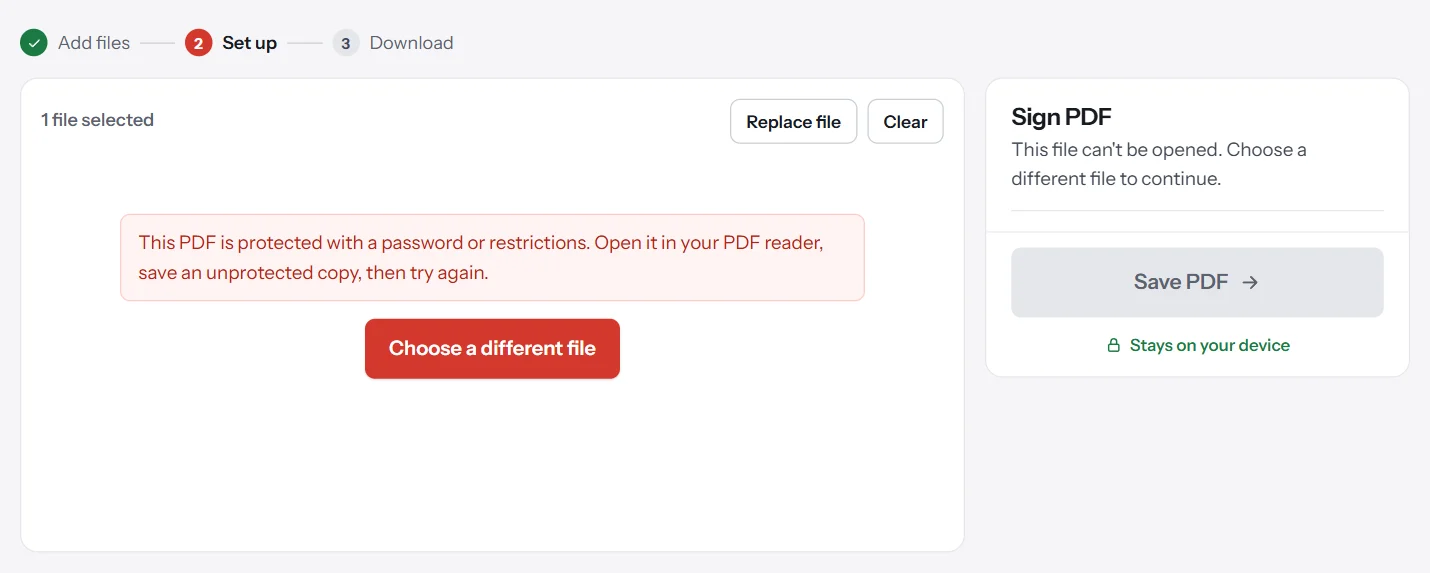
Once you've saved an unprotected copy using one of the methods above, every PDF Lemon tool will work on it. You could then merge it, compress it, sign it or edit it as normal. Since these tools work in your browser, the unprotected file isn't uploaded anywhere.
How to deal with statements that arrive password-protected
Banks, utilities and payroll companies often send PDFs protected with a password based on your details, such as your date of birth or part of an account number. The email or the provider's website usually explains the format, so check there before contacting anyone.
If you get these every month, removing the password from each one quickly becomes a chore. Here's a simpler routine. Keep the protected originals in one folder, and only make an unprotected copy when you need to send one to an accountant or a lender. Then delete that copy once it's served its purpose. That way, your archive stays protected, and you're never more than a minute from a usable file. If you need to combine several statements, make the unprotected copies first, then use Merge PDF.
How to check your unlocked copy
Before relying on the new file, take a minute to confirm it worked.
- Close and reopen it. It shouldn't ask for a password.
- Try printing and selecting text to confirm the restrictions are gone.
- Compare it with the original, checking page count, images and any fine print.
- Check the document properties. In most readers, File, then Properties shows the security settings, which should now say no security.
- Rename it clearly, so that you don't confuse it with the protected version, and decide whether you still need to keep both.
How to unlock a PDF on iPhone or Android
Phones can handle this as well, for a password you know.
On iPhone: open the PDF in the Files app or Safari and enter the password. Tap the share button, choose Print, then pinch outward on the preview to open it as a PDF, and save it with the share button again. Menu options can change between iOS versions.
On Android: open the PDF in Chrome or your PDF viewer, enter the password, open the menu, choose Print, and select Save as PDF as the printer.
In both cases, you're making a new copy, so the same limitations apply: links and form fields may not survive.
Common problems when removing a PDF password
The print option is greyed out. A permissions password blocks printing. You'll need that password, or a copy from the owner.
Acrobat won't let you change the security. Some documents are protected by a certificate or a rights management system rather than a password, and those can only be changed by whoever set them.
The new copy still asks for a password. You may be opening the old file. Check the name and folder, or your export settings may have kept the encryption on.
The text has become blurry or can't be selected. Some print routes convert pages into images. Try another browser, or use the Acrobat method.
"Print to PDF" fails on a work computer. Your organization may block this, for example on documents with a sensitivity label. Ask your IT team for help rather than looking for ways around it.
Questions and answers
How do I remove a password from a PDF for free?
Open the PDF in Chrome or another browser, enter the password, then print it and choose Save as PDF. The new copy has no password, though it may lose links and form fields. On a Mac, Preview can export an unprotected copy.
How do I unlock a PDF if I forgot the password?
Look for an unprotected copy, or ask whoever created the file. Adobe says Acrobat has no password recovery option. A strong open password can't realistically be recovered.
How do I remove password protection in Adobe Acrobat?
Open the file, go to All tools, then Protect a PDF, and choose Set security properties. Set the security method to No Security, confirm the password if asked, and save.
Is it legal to remove a password from a PDF?
It's generally fine on documents you own or have permission to change. Removing protection from someone else's document to get around restrictions may breach their rights or an agreement. If in doubt, ask the owner.
Can PDF Lemon remove a PDF password?
No. PDF Lemon can't open or remove passwords, and it shows a clear message when a file is protected. Save an unprotected copy with the steps in this guide, then use that copy in PDF Lemon's tools.
Why can't I print or copy my PDF, even though it opens without a password?
It probably has a permissions password, which restricts actions such as printing, copying or editing. You'd need that password, or an unrestricted copy from the owner, to change those settings.
Tools from this guide
How we checked this guide
We ran the PDF Lemon steps ourselves on the live tools. Steps for other apps come from each vendor's own help pages and are worded to survive small interface changes, but menu names can differ between versions.
Sources we used:
Related guides
- What Is a PDF? Meaning, Uses, and Features7 min read
- What Is a PDF Reader?7 min read
- How to Convert PDF to Word7 min read
- Are online PDF tools safe to use?1 min read
- How to Digitally Sign a PDF8 min read