How to Sign a PDF Electronically
Short answer
To sign a PDF electronically, open it in a tool such as PDF Lemon's Sign PDF, draw or type your signature, click the page where it belongs, and save the file. It takes about a minute and doesn't require printing. In the US and EU, electronic signatures are legally valid for most everyday agreements, though some documents need more.
Open Sign PDFKey takeaways
- An electronic signature can be a drawn signature, a typed name or an image. It shows your intent to sign.
- You can sign for free in a browser, in Mac Preview, or in Adobe Acrobat Reader.
- In the US and EU, the law generally doesn't deny a signature effect just because it's electronic.
- This guide covers visual e-signatures. For certificate-based signing, see our guide on digitally signing a PDF.
How to sign a PDF online
You don't need to print, sign and scan a document. PDF Lemon's signing tool runs in your browser, so your document and your signature stay on your device, which is exactly where you want them.
- Open Sign PDF. Go to PDF Lemon's Sign PDF and select your document.
- Create your signature. Draw it in the box with a mouse, trackpad or finger, or switch to Type and enter your name in a script style.
- Choose the ink and width. Blue makes an original easy to tell from a photocopy. Set the width to suit the signature line.
- Click the page. Your signature lands where you click. Drag it to fine-tune the position, and click again to place initials on other pages.
- Save your PDF. Click Save PDF and download the signed copy.
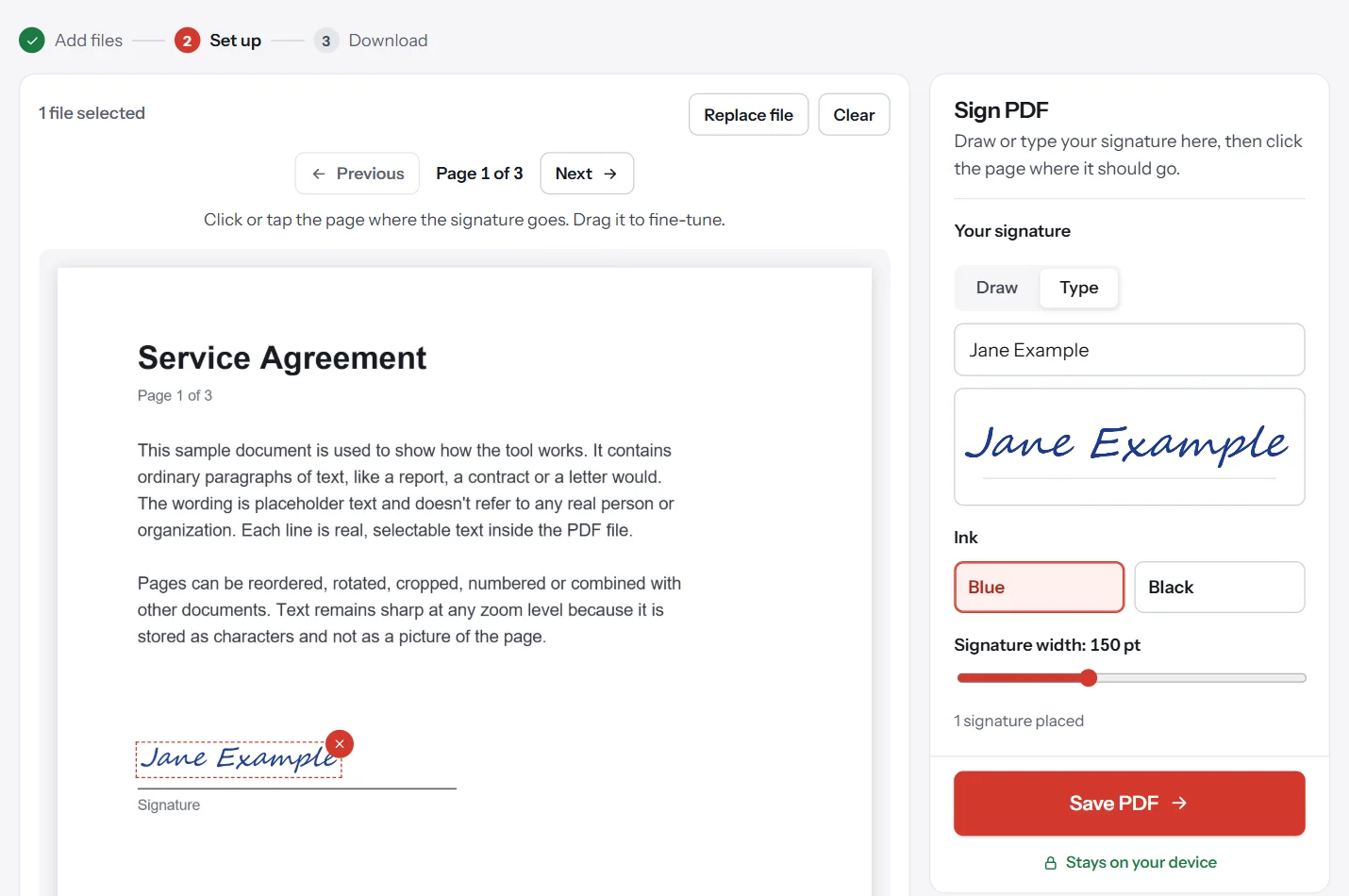
The signature is drawn into the page itself, rather than sitting on it as a movable note. Someone opening the file in a normal PDF reader can't simply drag it away. This is not the same as tamper protection, which needs a certificate-based signature, as explained below.
How to sign a PDF on a Mac
Preview is built in and can capture your signature in several ways.
- Open the PDF in Preview and show the Markup toolbar with View, then Show Markup Toolbar.
- Click the Sign button. It's the one that looks like a signature.
- Create a signature. Apple gives you three options: sign on the trackpad, hold a paper signature up to the camera, or use a nearby iPhone or iPad.
- Choose it from the list. Your signature appears on the page.
- Move and resize it, then save the file.
Preview remembers your signature for next time, and that makes it convenient if you sign documents often on your own Mac.
How to sign a PDF on Windows
Windows has no built-in signature tool for PDFs, so a browser is the easiest route. You have three free options.
- [Sign PDF](/sign-pdf/) in any browser, with drawn or typed signatures and exact placement.
- Chrome's viewer, where you select Draw, choose Pen, and write your signature directly on the page. Then use Download, choosing With your changes.
- Adobe Acrobat Reader, which includes a free Fill & Sign tool if you have it installed.
Be aware of a limitation in browser viewers. Mozilla says signatures added in Firefox's viewer are simple annotations that don't authenticate the signer. That's generally true of any simple drawn signature, and it's perfectly normal for everyday documents. It just isn't identity verification.
How to sign a PDF in Adobe Acrobat Reader
If you already have Adobe Acrobat Reader installed, its free tools include a signing option, which is often called Fill & Sign.
- Open your PDF in Acrobat Reader.
- Choose the Fill & Sign tool. In recent versions, it's listed among the tools or in the e-sign section.
- Add your signature. Type it, draw it or upload an image. Acrobat can save it for later.
- Click the page to place the signature, then resize it.
- Save the file.
This is still a visual electronic signature rather than a certificate-based one. Menu names vary between versions, and Adobe does change them, so look for "sign" if you can't find the exact wording.
How to sign a PDF on iPhone or Android
On iPhone or iPad, open the PDF in Files, tap the markup button, then tap the plus button to add a signature. Draw it with your finger and drag it into place. Mail and other apps offer the same markup tools for attachments.
On Android, open Sign PDF in your browser. Draw your signature with a finger in the signature box, then tap the page. Turn your phone sideways if you'd like more room to draw. Dedicated apps also exist, if you sign documents often on your phone.
What's the difference between electronic and digital signatures?
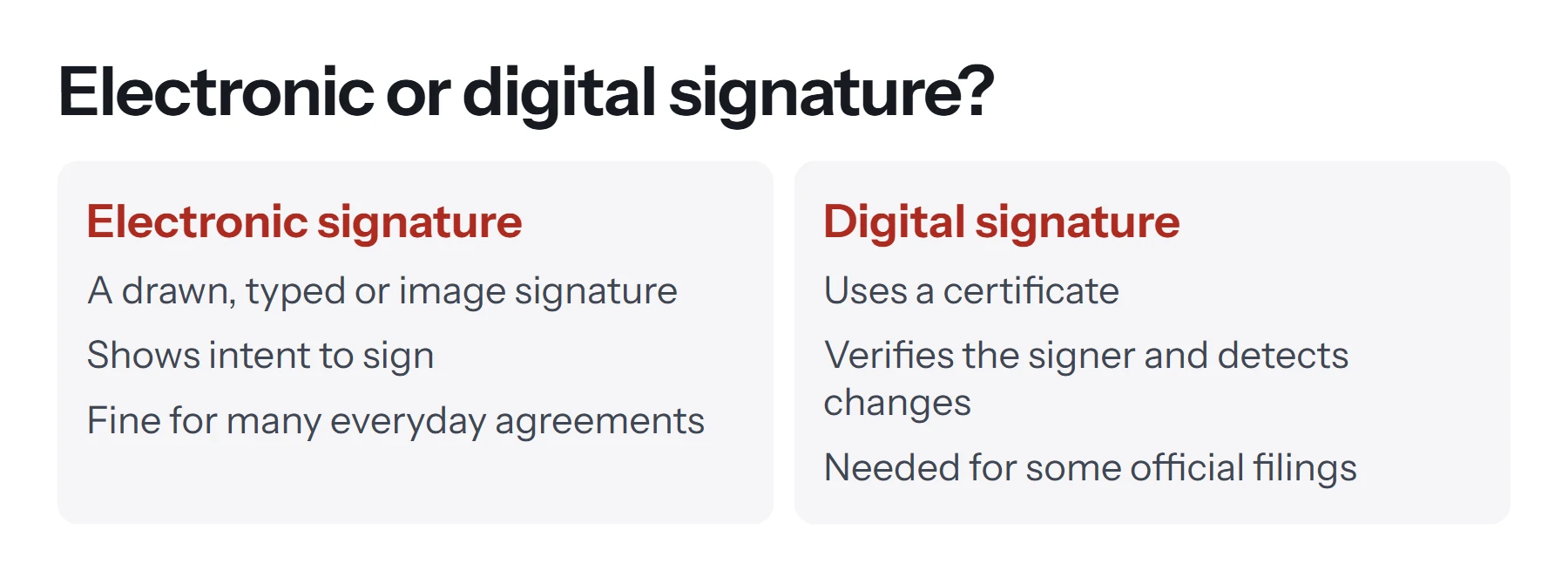
People use these terms interchangeably, but they're different technologies, and some documents specifically need one of them.
| Electronic signature | Digital signature | |
|---|---|---|
| What it is | A mark showing intent to sign | A cryptographic seal tied to a certificate |
| How you create it | Draw, type or upload an image | With a Digital ID in a tool such as Acrobat |
| Verifies identity | Not by itself | Yes, to the level of the certificate |
| Reveals later changes | No | Yes |
| Cost | Usually free | May involve a paid certificate |
| Typical use | Leases, offer letters, invoices, permission slips | Government filings, regulated industries |
PDF Lemon's tool adds a visual electronic signature. If someone has asked you for a digital or certified signature, see how to digitally sign a PDF instead.
Is an electronic signature legally binding?
For most everyday documents, in many countries, yes. Here's the general picture, though we're not lawyers and this isn't legal advice.
In the United States, the ESIGN Act says a signature or contract can't be denied legal effect solely because it's in electronic form. Most states also follow a similar law called UETA.
In the European Union, the eIDAS Regulation defines three levels of electronic signature: simple, advanced and qualified. A simple electronic signature can't be rejected in court solely for being electronic, while a qualified one carries the same legal weight as a handwritten signature.
Elsewhere, many countries have comparable laws, but details vary. Pakistan, the UK, Canada and Australia, for example, all have their own rules.
Exceptions are common. Wills, certain family law documents, some real estate filings and court documents often have stricter requirements, so ask the receiving party or a lawyer if the stakes are high.
What generally matters is that you clearly intended to sign, that you agreed to do business electronically, and that a record of the signed document is kept. That's why it's a good idea to save your signed copy.
How to type a signature on a PDF
A typed name can count as an electronic signature when it clearly shows your intent to sign. In Sign PDF, switch from Draw to Type, enter your name, and it appears in a handwriting style. This is useful if you don't have a touchscreen and a signature drawn with a mouse looks shaky. A signed line with a printed name and date beside it also helps, and you can add those with Edit PDF. Our guide on how to type on a PDF covers the details.
How to insert a signature image into a PDF
If you've got a scan of your handwritten signature, there are a few ways to use it. Preview on a Mac can capture one directly from the camera. Firefox's viewer can add an image as a signature, Acrobat lets you import one, and PDF Lemon's Add Image to PDF places one on any page without uploading it. To make a clean image, sign white paper with a dark pen, photograph it in good light, and crop tightly around the signature.
Be careful with that image file. A picture of your signature is easy to copy, so don't leave it in shared folders or send it around, and only use tools you trust. Tools that work on your device, rather than uploading the file, reduce the number of places it ends up.
Can you sign a PDF more than once?
Yes. Click the page again in Sign PDF to add the same signature to other pages, which is handy for initials. When several people need to sign, each can add theirs in turn and pass the file along.
What to do before and after signing
Good habits matter more than the tool you use.
Before you sign:
- Read the final version. Confirm that it's the document you agreed to, especially if it's been through several drafts.
- Fill in everything else first. Add dates and names, and complete any form fields. See how to fill out a PDF form.
- Check for other signature lines. Long contracts often need initials on every page.
After you sign:
- Open the signed copy to confirm the signature appears in the right place on the right page.
- Flatten any form fields. Flatten PDF locks form answers into the page so they can't be casually edited.
- Keep a copy. Save it somewhere you can find it, and keep any emails that show the other party's agreement.
- Check the file size. If it's too big to send, compress it using the Light level, which leaves the text selectable.
Common problems when signing a PDF
Clicking the page does nothing. Create your signature first, then click the page.
The signature looks shaky. Mouse signatures often do. Try a trackpad or a touchscreen, draw it larger and let the tool scale it down, or switch to a typed signature.
The signature is the wrong size. Set the width before placing it, or remove it and place it again.
It says the PDF is protected. The author has restricted changes. Ask them for a version you can sign, or see how to remove a password from a PDF if you're authorized.
The recipient says the signature isn't valid. They may require a certificate-based signature, or a specific service. Ask what they accept before re-signing.
The signature doesn't show in another app. If you've used a browser or an annotation tool, some viewers may not display annotations. PDF Lemon draws signatures into the page, which avoids this. In other tools, saving a fresh copy with Export as PDF or printing to PDF generally fixes it.
Questions and answers
How do I add a signature to a PDF for free?
Open PDF Lemon's Sign PDF, draw or type your signature, click where it should go, and save the PDF. There's no cost, no account, and the file stays on your device.
How do I sign a PDF without printing it?
Use any electronic signing tool. Sign PDF, Mac Preview and Adobe Acrobat Reader all let you add a signature on screen, so there's no need to print and scan.
Is an electronic signature legally binding?
In many places, yes. The US ESIGN Act and the EU's eIDAS Regulation both prevent a signature being rejected solely for being electronic. Some documents, such as wills, often have stricter rules. This isn't legal advice, so check for important documents.
How do I sign a PDF on my phone?
Open Sign PDF in your phone's browser, select the file, draw your signature with your finger, tap the page, and save. On iPhone, the markup tools in the Files app also include a signature option.
What's the difference between an electronic and a digital signature?
An electronic signature is any mark showing intent to sign, such as a drawn signature. A digital signature uses a cryptographic certificate to verify who signed and reveal any changes made afterward.
Can I sign a PDF in Word?
Word isn't designed for this. You could convert the PDF, add a signature image, and export it again, but the layout may change. A PDF signing tool is simpler and safer.
Tools from this guide
How we checked this guide
We ran the PDF Lemon steps ourselves on the live tools. Steps for other apps come from each vendor's own help pages and are worded to survive small interface changes, but menu names can differ between versions.
Sources we used:
Related guides
- How to Fill Out a PDF Form7 min read
- How to Digitally Sign a PDF8 min read
- How to Make a Fillable PDF Form7 min read
- How to Annotate and Write on a PDF8 min read
- How to Type on a PDF7 min read